0.3 · Open your first account
In 2 minutes
Before using the tool, you need an account. Creating one is free and takes two minutes: so you can do this chapter and the next three without spending anything.
What you saw in chapter 0.0 still holds: the free plan is enough for conversation. The paid plan becomes useful from chapter 1.5 onwards (to work on your own files), and necessary for Claude Design and Claude Code, in Parts III and IV. There is no rush, you will decide when the time comes.
Let's do it together
- Open your browser and go to claude.ai.
- Click the sign-up button, top right. Depending on your browser's language it may read “Sign up”, or whatever your own language calls it, but it is the same button. If you see “Log in” next to it, that is the other one: that one is for when you already have an account.
- Choose how you sign up. An email address you actually check is the safest. A Google account is quicker, but only if you know that Google account's password: otherwise you will lose more time than you gain.
- Confirm your address. If you chose email, a confirmation message arrives; open it and click the link. Remember to look in your junk folder if it is slow.
- Log in. You land on the home screen, and it is deliberately empty.
- Take thirty seconds to look around. Two things to spot, and only two: the message box, that big field where you write, and the conversation history, on the side, which will fill up as you go. You can ignore the rest for now.
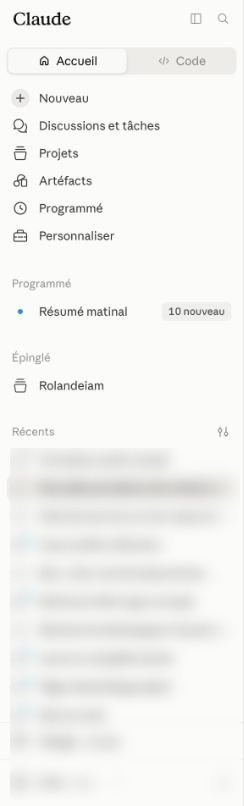
The words you will meet on screen
None of them changes how you use the tool: you write to Claude in ordinary words, and it answers in the same language, whatever the buttons say. Here are the eight you will come across.
You can also simply ask Claude: “put the interface in my language” or “where can I change the interface language?”. It will answer with the exact path as it stands today.
Interfaces move: a button can change place or colour from one update to the next. What you are looking for does not change, though: somewhere to write, and a list of your conversations. If you find those two things, you are in the right place.
Create your account now. Then, without thinking about how good your request is, write anything at all in the message box, “hello”, “tell me a joke”, and send.
The point is not to get a good answer: it is to see that the screen answers you. We will deal with asking well in the very next chapter.
- You are logged in and you can see your name or your initials somewhere on screen.
- You have had at least one answer from Claude, whatever it was.
- You can point at the message box and the conversation history.
- Using an address you rarely check. You risk missing the confirmation email, and that is the kind of detail that makes people give up on day one.
- Paying now because a button suggests it. The screen will offer you a paid plan. You do not need one before chapter 1.5.
- Being put off by the empty screen. It is empty on purpose. We fill it in two minutes.
- The account is created free of charge, in two minutes.
- Two landmarks on the home screen: the message box and the history.
- Whatever language the buttons are in, you write in your own.
- The paid plan is useful from chapter 1.5, and becomes necessary in Parts III and IV.
The rest of the handbook covers Claude, Higgsfield, Claude Design and Claude Code, with 11 recipes and a 30-day programme.
See the full handbook Open in the readerHear about it when the manual changes
The manual gets reworked as the tools change: new versions, screens that move, recipes brought back up to date. If you want to hear about it when that happens, leave your address. It is optional: the free extract stays readable with no account and no email address, and nothing closes if you skip this.
Your address is used only to announce updates to the manual. It is never sold or passed on. To unsubscribe, write to contact@atelieriacomplet.com. Personal data

This handbook is not an expert's course: it is the roadmap of my own learning of these tools, written for the least technical among us.
Read the full story